makerOSteam
makerOS team

AI builds with you. You stay in control.

makerOS leads your AI development through fixed quality gates that cannot be talked past. Local, traceable and with no vendor lock-in. With your CLIs and your models.

evaluation is free · runs on your machines · no cloud required

01 · the situation

AI development got fast. And hard to govern.

Four patterns emerging in almost every software team right now. Usually all at once.

risk 01
Shadow AI

Every developer uses a different tool. Nobody knows what things are built with, or where the data flows.

risk 02
Context loss

Every tool switch starts from zero. Decisions live in chat histories that are gone tomorrow.

risk 03
Lock-in

One vendor, one pricing model, one dependency. Switching means explaining everything again.

risk 04
Unverified quality

AI code lands in the repo because it looks plausible. Not because it was verified.

The problem is not the AI. The problem is the missing governance.

02 · the answer

Six things makerOS does not promise, but wires in.

Not a feature catalog, but six control guarantees. Each one is usable today and verifiable in the product.

control 01

Quality is wired in

The PIV engine leads every story through plan, implement, verify, security and commit. It checks the definition of ready, sets the gates and blocks the commit via a Git hook until security is green. The agent cannot wave itself through.

piv engine · git-hook gate · definition of ready
control 02

Security always checks

The security agent checks every story before the commit closes. Always, with zero extra effort. If you want to go one step further, you add a second CLI as an independent review partner: two machines, four eyes, right in the development flow.

security agent · optional: second cli as review partner
control 03

No context loss

A local memory database holds projects, sessions, plans and decisions. Searchable by keyword and by meaning. You switch tools without explaining the project again. State lives in the database, not in a chat history.

hybrid search · project id, not folder name · event chronicle
control 04

No lock-in

You bring your own subscriptions. Claude Code, Codex, Antigravity, Vibe, Cline, OpenCode and Grok run as equal coding CLIs, including automatic MCP wiring on project import. Plus every coding AI on the market, local models too. And you pick per role: build, verify, chat.

claude code · codex · antigravity · vibe · cline · opencode · grok · mcp
control 05

Data stays in the house

Fully local development is possible. Local models via Ollama, voice control that never leaves the machine, no account and no tracking. makerOS contains no AI model of its own. Your policy decides which models run.

ollama · no account · no tracking
control 06

Reality before investment

The reality check simulates market reactions in a 17-step pipeline: competition, 24 personas, pricing and a verdict with confidence, before weeks are invested. Planning additionally weaves in 175 curated knowledge files, from sources like OWASP, NN/g and GOV.UK.

17 steps · 175 knowledge files · 17 domains
03 · a day in the sprint

What control feels like day to day.

Not a new process you have to roll out. makerOS runs it: sketch, remember, plan, build, verify, hand over.

09:04
Open the project. The state is there.

One call delivers the last session with its summary, open handoffs and the quality criteria in force. No re-reading and no explaining again.

09:30
Sketch. On one canvas.

Human and AI work on the same whiteboard. The CLI draws architectures in one go and attaches sources as notes. It never touches your hand-drawn elements.

10:15
Plan. With knowledge woven in.

Story planning searches the project memory and pulls the right rules from 175 knowledge files: privacy, accessibility, security. And all of it before a single line of code exists.

11:00
Build. The engine leads.

Plan, implement, verify, security, commit. The PIV engine enforces the order, moves the Kanban card and writes the history.

15:40
Security. Green first, then done.

The security agent checks the story. Only once the security gate is green can the commit close. Optionally, a second CLI reads along as well.

18:00
Hand over. One line is enough.

One line of summary in the evening. Tomorrow morning it is right there again, for everyone on the project.

04 · agile built in

Your agile process, out of the box.

makerOS fully supports agile development. The AI agents are trained on it: they create epics and stories automatically and fill them with tasks and acceptance criteria.

  • Epics and stories are created automatically, cleanly sliced
  • Every story is born with tasks and acceptance criteria
  • Definition of ready and definition of done are gates, not intentions
backlog · created by the agent
EpicCustomer portal onboarding
StorySign-up with SSO
tasks
Build the UI flow
Wire up SSO
Cover the error cases
acceptance criteria
Login takes under 3 seconds
Error messages are understandable
Privacy notice is visible
StoryComplete the profiletasks + criteria created
StoryInvite the teamtasks + criteria created
schematic view
05 · a look inside

This is what it looks like inside.

Board, whiteboard and terminal are real screenshots from the app. The reality check is shown as a schematic.

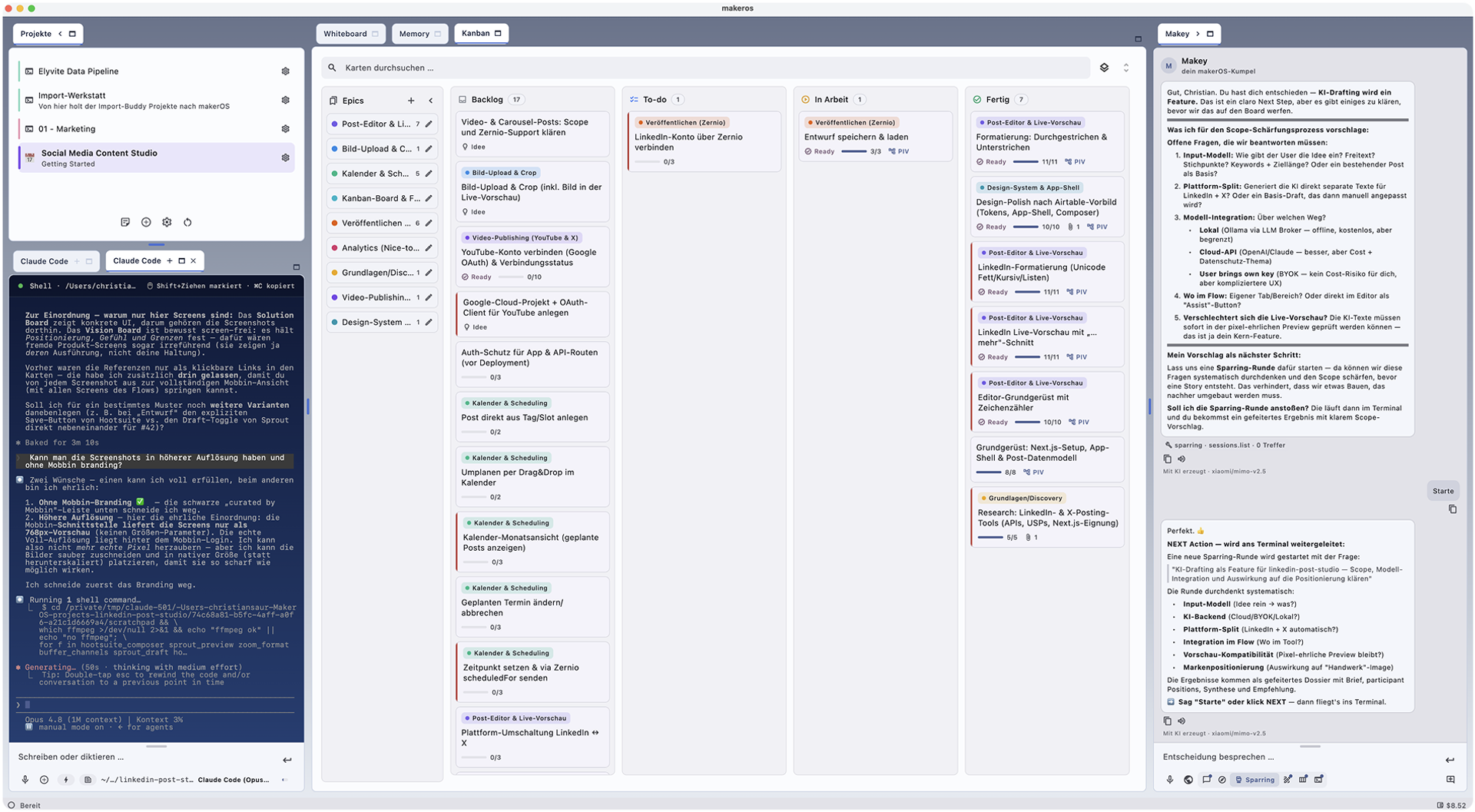
the kanban board

Every task has a place.

Cards move from planned to done. The engine moves them along, and you always see what is being built right now. Files attach directly to the card.

The Kanban board in makerOS
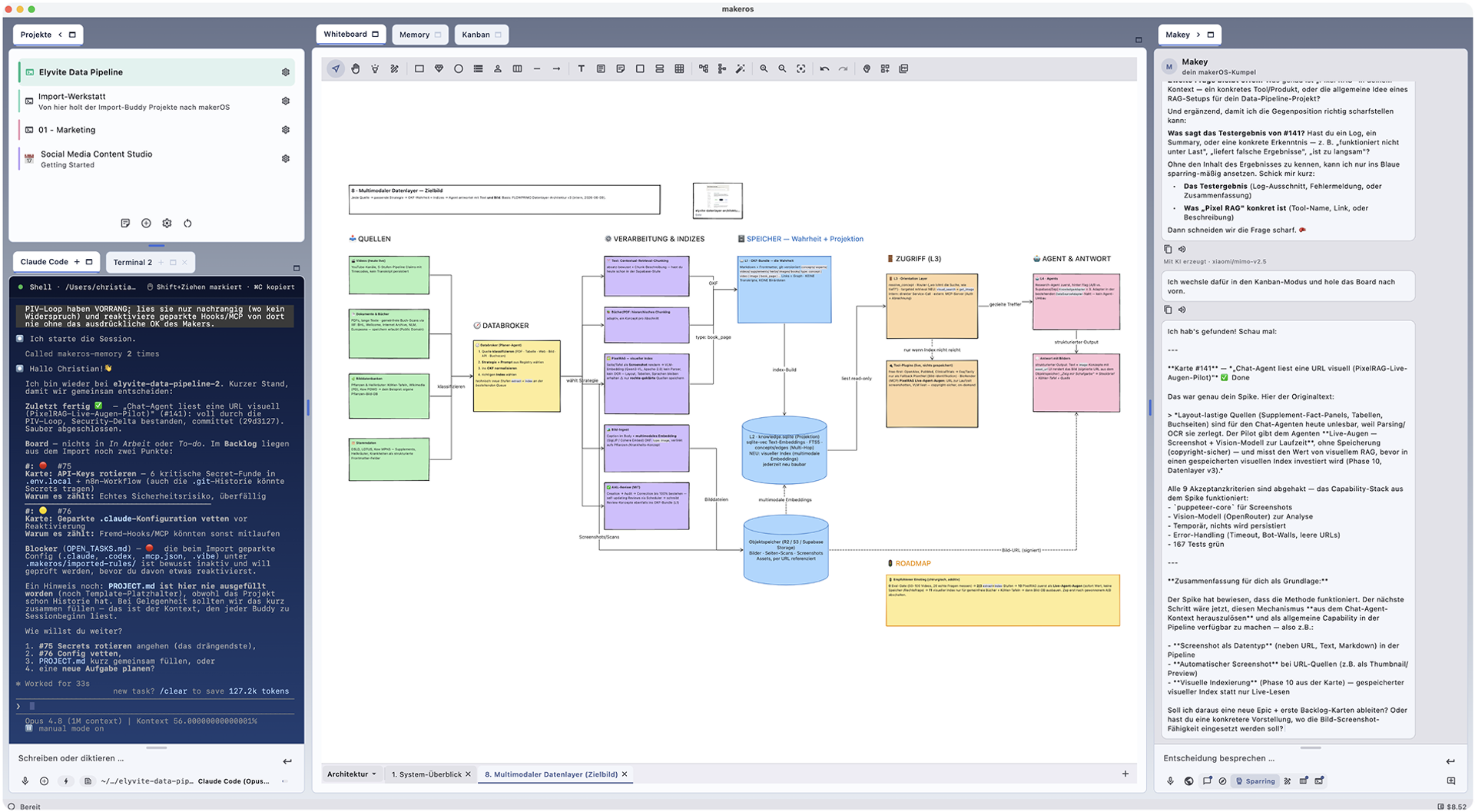
the whiteboard

Thinking on one canvas.

Human and AI draw on the same surface. The CLI drops complete diagrams onto the board in one go. One click lifts the essence into project memory.

The whiteboard in makerOS
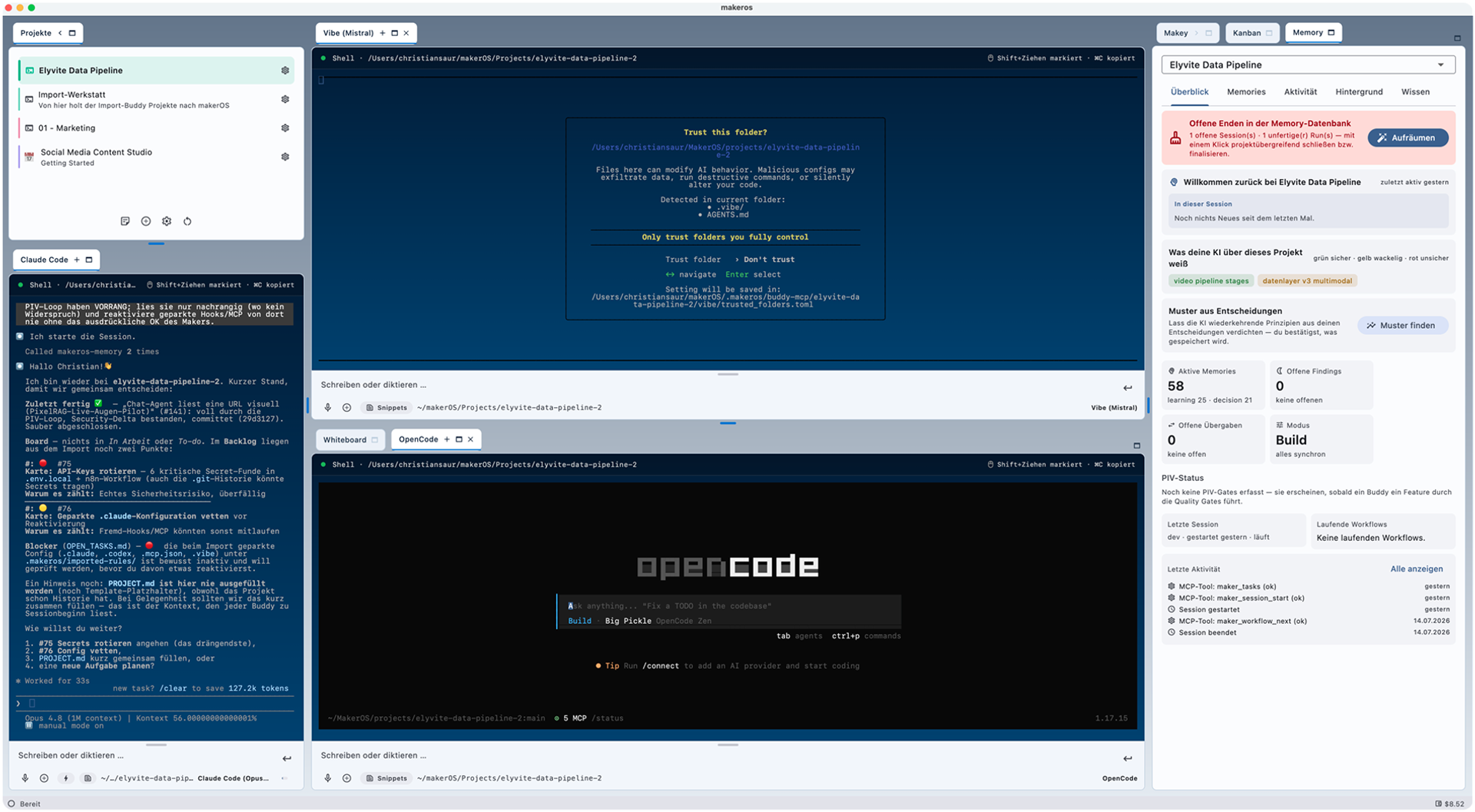
the terminal

Your CLIs, one home.

The built-in terminal runs Claude Code, Codex, Antigravity, Vibe, Cline, OpenCode and Grok as equals. Plus every coding AI on the market, local models too. Switching costs one click, not your context.

The terminal in makerOS
the reality check

A verdict before you build.

The pipeline tests an idea against the market in 17 steps: competition, 24 simulated personas, pricing analysis. At the end there is a report with a clear verdict.

reality-check · report
verdict
Promising, with conditions
confidence0%
17
steps
24
personas
6
competitors
  • Willingness to pay in 18 of 24 personas
  • Gap in the market: nobody solves the onboarding pain
  • Price anchor sits higher than assumed
schematic view of a report result
06 · pilot program

We are building makerOS Team right now. With you.

makerOS Solo is in productive use. What a team needs beyond that is being built now: shared boards, roles, handoffs. For that we are looking for a handful of companies that run makerOS in a real project.

what you get

  • A direct line to the development team, no ticket queue
  • Guided rollout in your project, adapted to your policy
  • Real influence on which team features get built first

what we ask for

  • A real project and a team that works with it
  • Honest feedback, including the uncomfortable kind
  • A short regular conversation about what is missing
Request a pilot project
07 · questions decision-makers ask

The questions that come up in the meeting.

Answered short and honestly. The rest in a conversation.

What does it cost?

You can evaluate makerOS Solo for free, in commercial settings too. You only pay for your own AI subscriptions with each provider. makerOS Team will be a commercial product. We will define pricing and terms together with the pilot companies.

Where does our data run?

On your machines. makerOS needs no account, does not track, and contains no AI model of its own. Fully local development is possible, for example via Ollama. Your policy decides which models are connected.

Which AI tools are supported?

Claude Code, Codex, Antigravity, Vibe (Mistral), Cline, OpenCode and Grok run as equal coding CLIs, including automatic MCP wiring. Plus every coding AI on the market, local models too, for example via Ollama. And you pick per role: build, verify, chat.

How does makerOS actually enforce quality?

Through an engine, not through prompts. A definition of ready, fixed quality gates from plan to commit, and a Git hook that blocks the commit until the security agent reports green. Optionally, a second CLI reads along as an independent review partner.

What are the requirements?

macOS on Apple Silicon. The app is Apple-signed and notarized, an Intel build is in preparation. You bring your own CLI, installed and signed in.

When is makerOS Team coming?

The team edition is being built right now, together with the pilot companies. We deliberately name no date: what gets built first is decided by the pilots and their real needs.

two paths, one goal

Evaluate it today. Shape it with us.

macos (apple silicon) · your clis, your models · runs locally if you want